
Identity is hard. Distributed identity? That's a whole other level of pain.
If you're building a modern full-stack application, you likely have a high-performance frontend (Next.js 16) and a robust, transactional backend (Spring Boot 3.4+).
Connecting them securely is where 90% of developers create vulnerabilities. I've seen it all—tokens in local storage, exposed client secrets, you name it.
In this guide, we’re going to fix that. We’ll implement the BFF (Backend for Frontend) pattern. We will use Auth.js (formerly NextAuth) to handle the social login flow, and Spring Security 6.4 to act as a blind, stateless Resource Server that trusts those tokens.
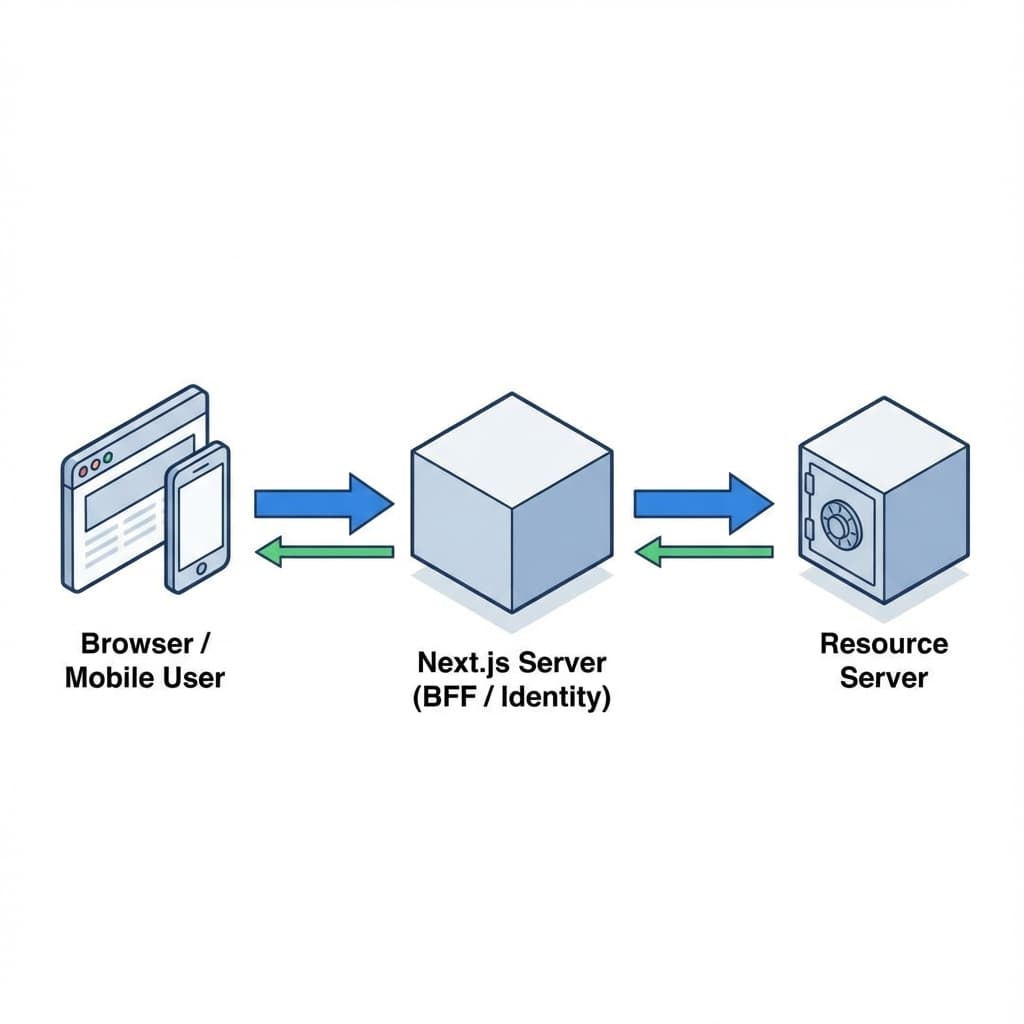
The Architecture
- User clicks "Login with GitHub" on Next.js.
- Next.js (Server Identity) handles the OAuth2 code grant. It receives an
access_tokenandid_token. - Auth.js stores this session in an encrypted
HttpOnlycookie. - Client Request goes to Next.js API Route / Server Action.
- Next.js retrieves the
access_tokenfrom the session and calls Spring Boot. - Spring Boot validates the JWT signature against GitHub's JWKS (JSON Web Key Set).
Frontend: Next.js 16 + Auth.js
First, let's configure Auth.js. This is our "Public Security" layer. It handles the user-facing complexity so our backend doesn't have to.
// src/auth.ts
import NextAuth from "next-auth"
import GitHub from "next-auth/providers/github"

export const { handlers, auth, signIn, signOut } = NextAuth({
  providers: [GitHub],
  callbacks: {
    async jwt({ token, account }) {
      // Persist the OAuth access_token to the token right after signin
      if (account) {
        token.accessToken = account.access_token
      }
      return token
    },
    async session({ session, token }) {
      // Send properties to the client
      session.accessToken = token.accessToken as string
      return session
    },
  },
})Crucially, implementing a middleware allows us to attach this token to requests headed for Spring.
// src/lib/api-client.ts
import { auth } from "@/auth";

export async function fetchFromSpring(endpoint: string) {
    const session = await auth();
    const token = session?.accessToken;

    if (!token) throw new Error("Unauthorized");

    const response = await fetch(\`https://api.myapp.com\${endpoint}\`, {
        headers: {
            'Authorization': \`Bearer \${token}\`,
            'Content-Type': 'application/json'
        }
    });

    return response.json();
}Backend: Spring Security Resource Server
On the Java side, we don't care about login forms, redirects, or client secrets. We only care about The Token.
Spring Security 6 makes this trivial with oauth2ResourceServer.
@Configuration
@EnableWebSecurity
public class ResourceServerConfig {

    @Value("${spring.security.oauth2.resourceserver.jwt.issuer-uri}")
    String issuerUri;

    @Bean
    public SecurityFilterChain filterChain(HttpSecurity http) throws Exception {
        http
            .authorizeHttpRequests(auth -> auth
                .requestMatchers("/api/public/**").permitAll()
                .anyRequest().authenticated()
            )
            .oauth2ResourceServer(oauth2 -> oauth2
                .jwt(jwt -> jwt
                    .decoder(JwtDecoders.fromIssuerLocation(issuerUri))
                )
            );

        return http.build();
    }
}The "Magic" of JWK Set URI
When you set issuer-uri in application.yml:
spring:
  security:
    oauth2:
      resourceserver:
        jwt:
issuer-uri: https://token.actions.githubusercontent.comSpring Boot automatically:
- Calls
/.well-known/openid-configuration. - Finds the
jwks_uri. - Downloads the public keys used to sign the tokens.
- Rotates them automatically if the provider changes keys.
Handling "SameSite" Cookies
In 2025, browser privacy rules are strict. If your Next.js app is on app.com and Spring is on api.com, you might face cookie issues if you try to share cookies directly.
This is why the Token Exchange approach (Bearer Token) is superior for this stack. The cookie stays with Next.js (SameSite=Lax), and only the secure backend channel sees the Bearer token.
WebClient Configuration
If Spring needs to call another downstream microservice on behalf of the user (Token Relay), use WebClient.
@Bean
public WebClient webClient(OAuth2AuthorizedClientManager authorizedClientManager) {
    ServletOAuth2AuthorizedClientExchangeFilterFunction oauth2Client =
            new ServletOAuth2AuthorizedClientExchangeFilterFunction(authorizedClientManager);

    return WebClient.builder()
            .apply(oauth2Client.oauth2Configuration())
            .build();
}Conclusion
By decoupling the Identity Provider (Next.js/Auth.js) from the Resource Server (Spring Boot), you get the best of both worlds:
- A user-friendly, social-login capable frontend.
- A stateless, scalable, and secure backend foundation.