It’s 5:00 PM on a Friday. You deploy your code. You hit the API. 500 Internal Server Error.
org.hibernate.LazyInitializationException: failed to lazily initialize a collection of role: com.example.User.roles, could not initialize proxy - no Session
Every Java developer faces this.
Most people Google it, find a StackOverflow answer saying "Just set spring.jpa.open-in-view=true" or "change @OneToMany to FetchType.EAGER", and move on.
Please don't do that. You are solving the error but creating a massive performance bottleneck.
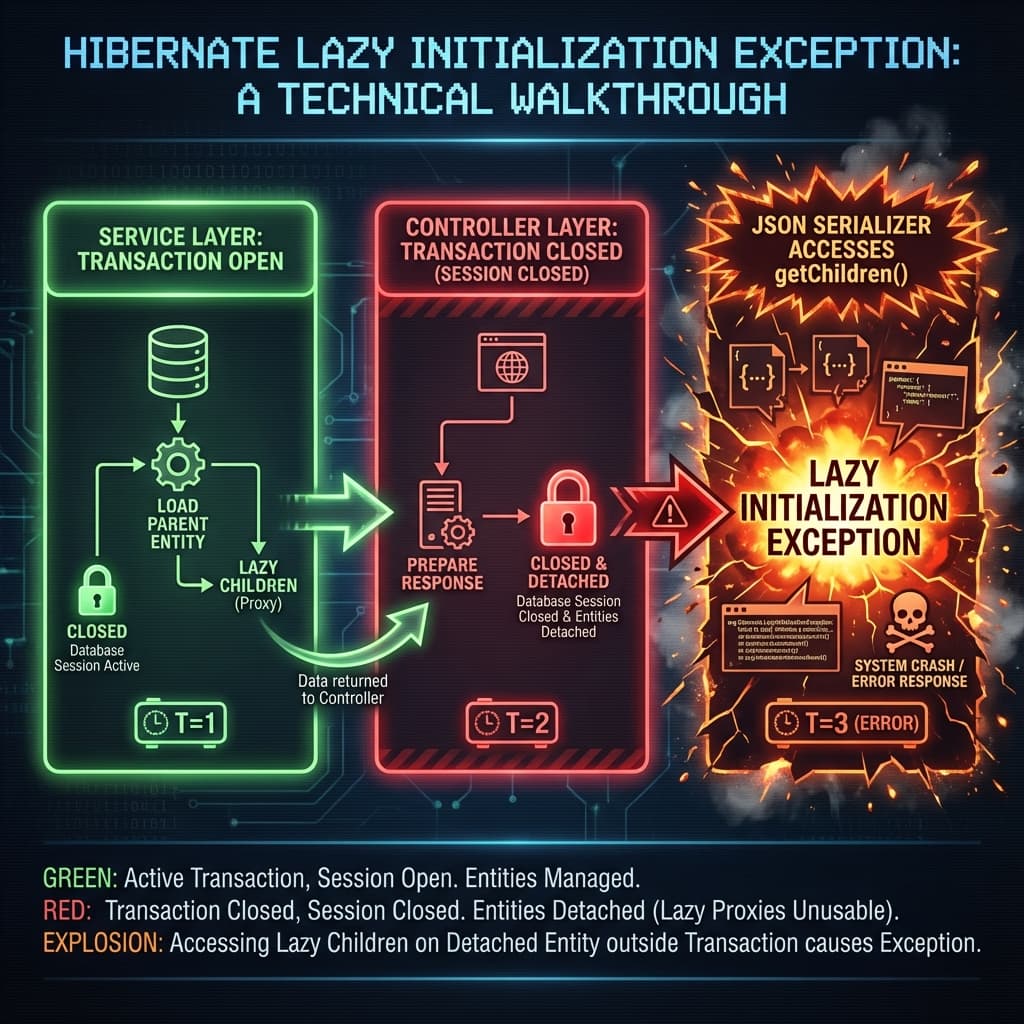
Why does this happen?
Hibernate uses Proxies. When you load a User, it doesn't load their Roles list from the database immediately (that's Lazy loading). Instead, it puts a placeholder (Proxy) there.
- Service Layer (Transaction Open): You fetch the User. The Session is alive.
- Controller Layer (Transaction Closed): The transaction finishes. The Hibernate Session closes. The data is "Detached".
- JSON Serialization: Jackson tries to turn your User into JSON. It calls
user.getRoles(). - Boom: The Proxy tries to call the database to load the roles, but the connection is gone.
LazyInitializationException.
The Bad Fix: enable_lazy_load_no_trans
There is a Hibernate property called hibernate.enable_lazy_load_no_trans=true.
Do not use this.
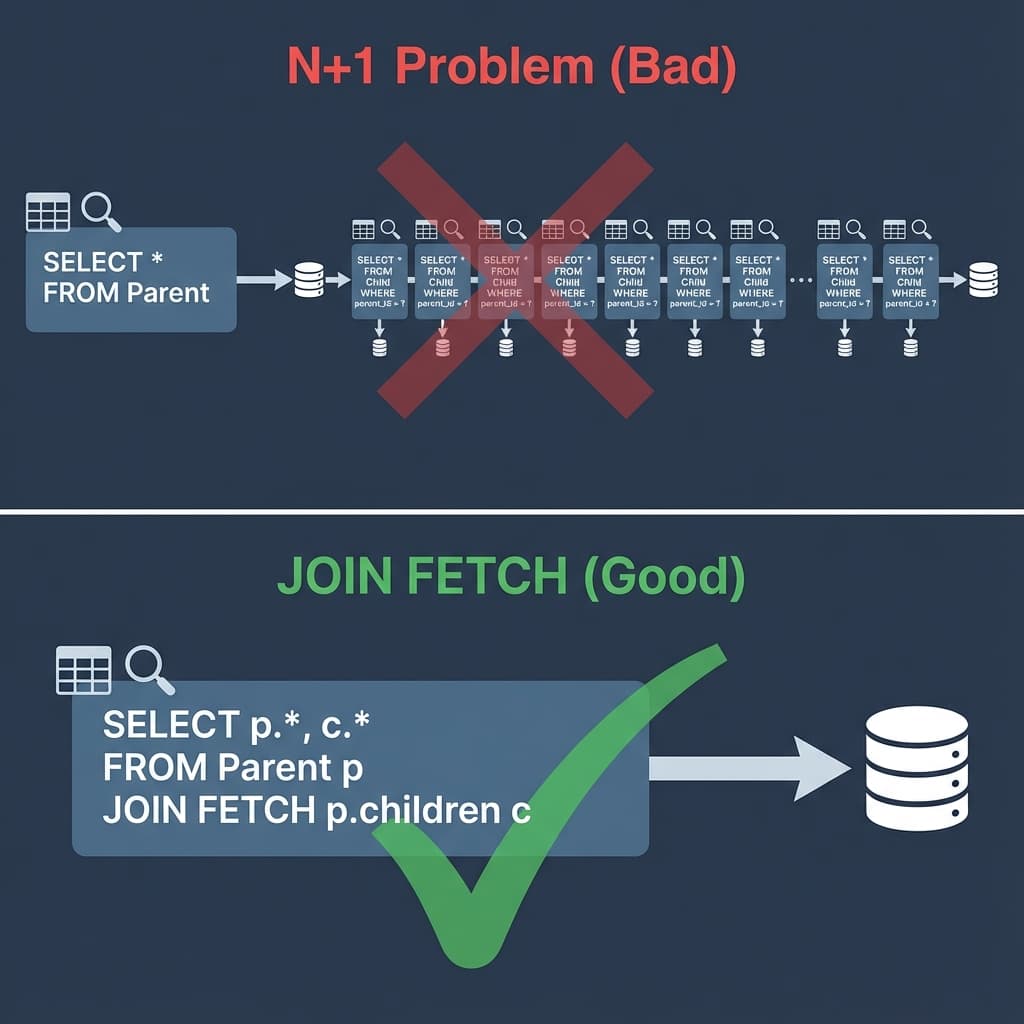
It tells Hibernate: "If the session is closed, just open a quick temporary new database connection to fetch this one field." If you are serializing a list of 100 users, this will open 100 tiny database connections. This is the N+1 Select Problem, and it will kill your database.
Solution 1: JOIN FETCH (JPQL)
The most robust solution is to tell Hibernate to fetch the data eagerly for this specific query, using JOIN FETCH.
public interface UserRepository extends JpaRepository<User, Long> {

    // ❌ Standard findById (Lazy)
    // Optional<User> findById(Long id);

    // ✅ Eager Fetch (Good)
    @Query("SELECT u FROM User u JOIN FETCH u.roles WHERE u.id = :id")
    Optional<User> findByIdWithRoles(@Param("id") Long id);
}This generates one single SQL query that gets both User and Roles. No proxies. No errors.
Solution 2: @EntityGraph (The Clean Annotation)
If you don't like writing JPQL strings, Spring Data JPA provides @EntityGraph.
public interface UserRepository extends JpaRepository<User, Long> {

    @EntityGraph(attributePaths = {"roles", "address"})
    Optional<User> findById(Long id);
}This does the exact same thing as JOIN FETCH but purely with annotations. You can even define named EntityGraphs on your entity class to reuse them.
Solution 3: DTO Projections (The Best Way)
Sometimes, you don't even need the Entity. If you are just building an API response, fetch a DTO (Data Transfer Object) directly.
Hibernate is smart enough to select only the columns you need.
public interface UserRepository extends JpaRepository<User, Long> {

    // Define a simple Java Record
    record UserSummary(String username, String roleName) {}

    @Query("SELECT new com.example.dto.UserSummary(u.username, r.name) " +
           "FROM User u JOIN u.roles r WHERE u.id = :id")
    List<UserSummary> findUserSummary(@Param("id") Long id);
}Why this wins:
- Zero Lazy Loading issues: It's just a POJO/Record, not a Hibernate entity.
- Performance: You only select the 2 columns you need, instead of
SELECT *. - Safety: You can't accidentally trigger a LazyInitException because there are no proxies.
Summary
LazyInitializationException is not a bug; it's a feature protecting you from loading your entire database into memory.
- Avoid
OpenEntityManagerInView(it keeps DB connections open too long). - Use
JOIN FETCHor@EntityGraphwhen you need the Entities. - Use DTO Projections for read-only API responses.
Fix it at the query level, not the config level.
Happy Coding! 🚀