You're building a microservice. It's simple: a user places an order, you save it to the database, and then you publish an OrderCreated event to Kafka so the Shipping Service can do its job.
Easy, right?
@Transactional
public void createOrder(Order order) {
    // 1. Save to Database
    orderRepository.save(order);

    // 2. Publish to Kafka
    kafkaTemplate.send("orders", order);
}Wrong.
This code has a fatal flaw known as the Dual Write Problem.
What is the Dual Write Problem in microservices?
Here is the nightmare scenario:
- Your code commits the transaction to the database. Success. The order is created.
- Immediately after, your server crashes. Or the network blips. Or Kafka is down.
- The event is never published.
The result? You have an order in your database, but the Shipping Service never knows about it. The customer pays, but the package never ships. Data inconsistency.
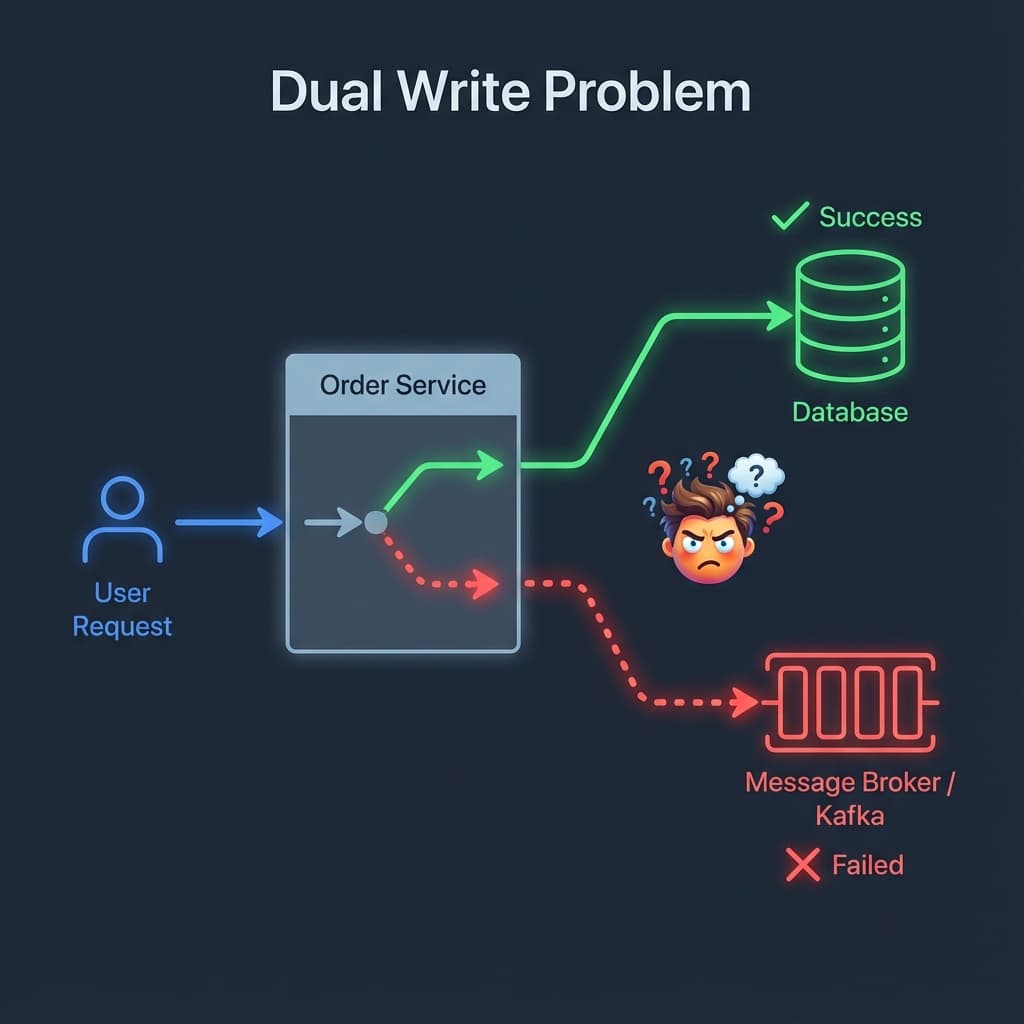
You might think, "I'll just reverse it! Publish to Kafka first, then save to DB!" Nope. What if the Kafka publish succeeds, but the database save fails (constraint violation)? Now Shipping is trying to ship an order that doesn't exist.
You cannot treat a database transaction and a message broker publish as a single atomic unit (unless you want to use Two-Phase Commit / XA Transactions, which essentially kill performance and availability).
So, how do we solve this? Enter the Transactional Outbox Pattern.
How does the Transactional Outbox Pattern solve data consistency?
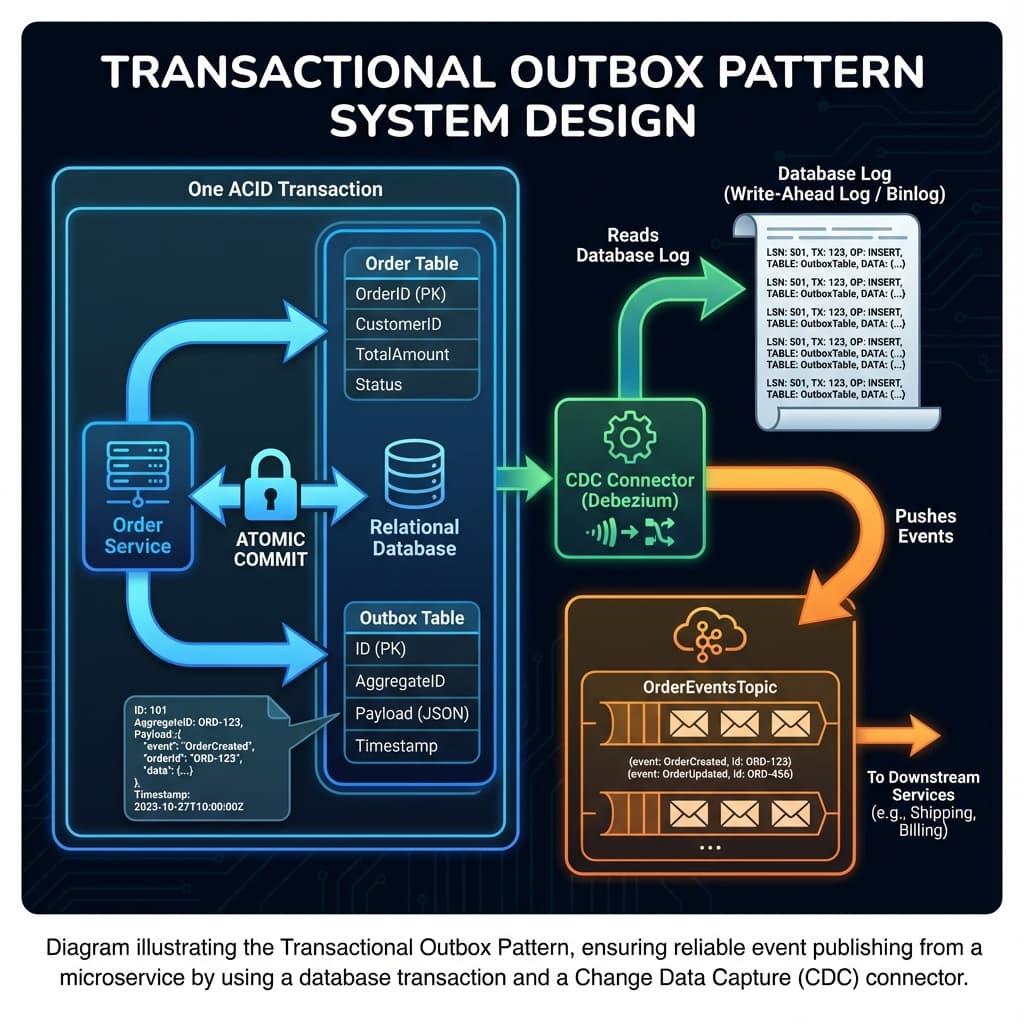
The Outbox Pattern is elegantly simple. Instead of sending the message directly to Kafka, you save it to a database table in the same transaction as your business data.
Here is the new flow:
- Begin Transaction.
- Save
Orderto theorderstable. - Save
OrderCreatedevent to anoutboxtable. - Commit Transaction.
Because this is a single ACID transaction within your database, it is atomic. Either both happen, or neither happens. No more inconsistency.
But wait—the message is now stuck in a database table. How does it get to Kafka?
That's where CDC (Change Data Capture) comes in.
Why use CDC instead of polling for the Outbox Pattern?
Effectively, we need a "Message Relay" process. There are two ways to do this:
1. The "Polling" Approach (The Old Way)
You write a cron job that runs every second:
SELECT * FROM outbox WHERE processed = false
Then it loops through them, publishes to Kafka, and updates them to processed = true.
The Problem:
- Latency: You depend on the polling interval.
- Database Load: Constant polling hammers your database, even when empty.
- Complexity: You have to handle locking so multiple instances don't process the same message.
2. The CDC Approach (The "Pro" Way)
Tools like Debezium act as a log reader. They hook directly into your database's transaction log (Write-Ahead Log in Postgres, Binlog in MySQL).
When you commit a row to the outbox table, the database writes to its log. Debezium sees this instantly and pushes the change to Kafka.
- Zero Polling: It pushes events as they happen.
- Zero Database Load: It reads the log files, not the data tables.
- Reliable: If the connector crashes, it resumes from the exact log position where it left off.
How do you implement the Outbox Pattern with Spring Boot and Debezium?
Let's build this.
Step 1: The Outbox Table
First, create a table to hold your events.
CREATE TABLE outbox (
    id uuid NOT NULL PRIMARY KEY,
    aggregate_type varchar(255) NOT NULL,
    aggregate_id varchar(255) NOT NULL,
    type varchar(255) NOT NULL,
    payload jsonb NOT NULL,
    created_at timestamp NOT NULL
);Step 2: The Service Implementation
In your Spring Boot application, your service now looks like this:
@Service
@RequiredArgsConstructor
public class OrderService {

    private final OrderRepository orderRepository;
    private final OutboxRepository outboxRepository;
    private final ObjectMapper objectMapper;

    @Transactional
    public Order createOrder(OrderRequest request) {
        // 1. Create and Save the Order (Business Logic)
        Order order = new Order(request);
        orderRepository.save(order);

        // 2. Create the Event
        OrderCreatedEvent event = new OrderCreatedEvent(order.getId(), order.getTotal());

        // 3. Save to Outbox (Same Transaction!)
        OutboxEvent outboxEvent = OutboxEvent.builder()
                .id(UUID.randomUUID())
                .aggregateType("ORDER")
                .aggregateId(order.getId().toString())
                .type("ORDER_CREATED")
                .payload(objectMapper.valueToTree(event)) // Store as JSON
                .createdAt(Instant.now())
                .build();

        outboxRepository.save(outboxEvent);

        return order;
    }
}That's it for the Java code. We don't touch Kafka here. The transaction commits, and we are safe.
Step 3: Configuring Debezium
You don't write Java code for Debezium; usually, you deploy it as a Kafka Connect container. Here is a sample configuration (JSON) to tell Debezium to watch your database:
{
  "name": "order-outbox-connector",
  "config": {
    "connector.class": "io.debezium.connector.postgresql.PostgresConnector",
    "database.hostname": "postgres",
    "database.port": "5432",
    "database.user": "postgres",
    "database.password": "password",
    "database.dbname": "orderdb",
    "database.server.name": "order-service-db",
    "table.include.list": "public.outbox",
    "plugin.name": "pgoutput",
    "transforms": "outbox",
    "transforms.outbox.type": "io.debezium.transforms.outbox.EventRouter",
    "transforms.outbox.table.fields.additional.placement": "type:header:eventType"
  }
}Key Magic: The transforms.outbox line. Debezium has a specific SMT (Single Message Transform) designed exactly for the Outbox pattern.
- It reads the
payloadcolumn and sends that as the Kafka message body. - It takes the
aggregate_idand uses it as the Kafka Record Key (ensuring ordering). - It takes the
typeand puts it in the Kafka header.
Step 4: Consuming the Event
Now, your downstream services just listen to the Kafka topic.
@KafkaListener(topics = "outbox.event.order", groupId = "shipping-service")
public void handleOrderEvent(@Payload String payload,
                             @Header("eventType") String eventType) {
    if ("ORDER_CREATED".equals(eventType)) {
        OrderCreatedEvent event = objectMapper.readValue(payload, OrderCreatedEvent.class);
        shippingService.scheduleShipment(event);
    }
}What are the trade-offs of using the Outbox Pattern with CDC?
While this architecture is robust, there are a few things to keep in mind:
- At-Least-Once Delivery: Debezium guarantees that usage messages will be delivered at least once. It does not guarantee exactly-once. Your consumers (the shipping service) must be idempotent. If they receive the same "Order Created" message twice, they shouldn't ship two packages.
- Order of Events: Because we are reading the transaction log, events are naturally ordered. If you create an order and then immediately update it, Debezium will see the INSERT followed by the UPDATE in the correct sequence.
- Cleaning Up: Your
outboxtable will grow effectively forever. You need a strategy to clean it.- Delete after read: Debezium can be configured to delete the row right after processing it? (Tricky with the Transaction log).
- TTL / Cron job: Just run a daily job:
DELETE FROM outbox WHERE created_at < NOW() - INTERVAL '3 DAYS'. Since the data is in Kafka, the table is just a temporary buffer.
Conclusion
The Dual Write problem is one of those distributed system gotchas that bites everyone at least once.
Using the Transactional Outbox Pattern with CDC turns a distributed transaction problem into a local database transaction problem—which databases are really, really good at solving.
It forces a strict consistency model: If it's in the database, it will be in Kafka.
Implementation might look like "over-engineering" at first compared to a simple kafka.send(), but when your production database goes down and comes back up, and you realize you haven't lost a single event? That peace of mind is worth every line of config.
References
- Debezium Documentation — Official CDC platform documentation
- Debezium Outbox Event Router — The specific SMT for the Outbox Pattern
- Chris Richardson's Microservices Patterns — Transactional Outbox pattern description
- Apache Kafka Documentation — Message broker documentation
Keep Reading
- The System Design Question That Failed 80% of Candidates — The Outbox Pattern is exactly the kind of deep knowledge that separates candidates in system design interviews.
- Mastering Virtual Threads in Java 25 — Virtual Threads can dramatically improve the throughput of your CDC consumers and microservice endpoints.
